Spell check online: check if your spelling is correct
Spell check online in your browser: paste a draft or open a document, and every misspelled word gets a red wavy underline. The Editor pane walks you through the fixes, and nothing is installed or uploaded.
- English and Russian text
- Suggestions in one click
- Word stats and readability
- Opens DOCX, TXT, Markdown, HTML
- Works with
- .docx
- .dotx
- .docm
- .txt
- .md
- .html
How to spell check online
Paste your text or open a file
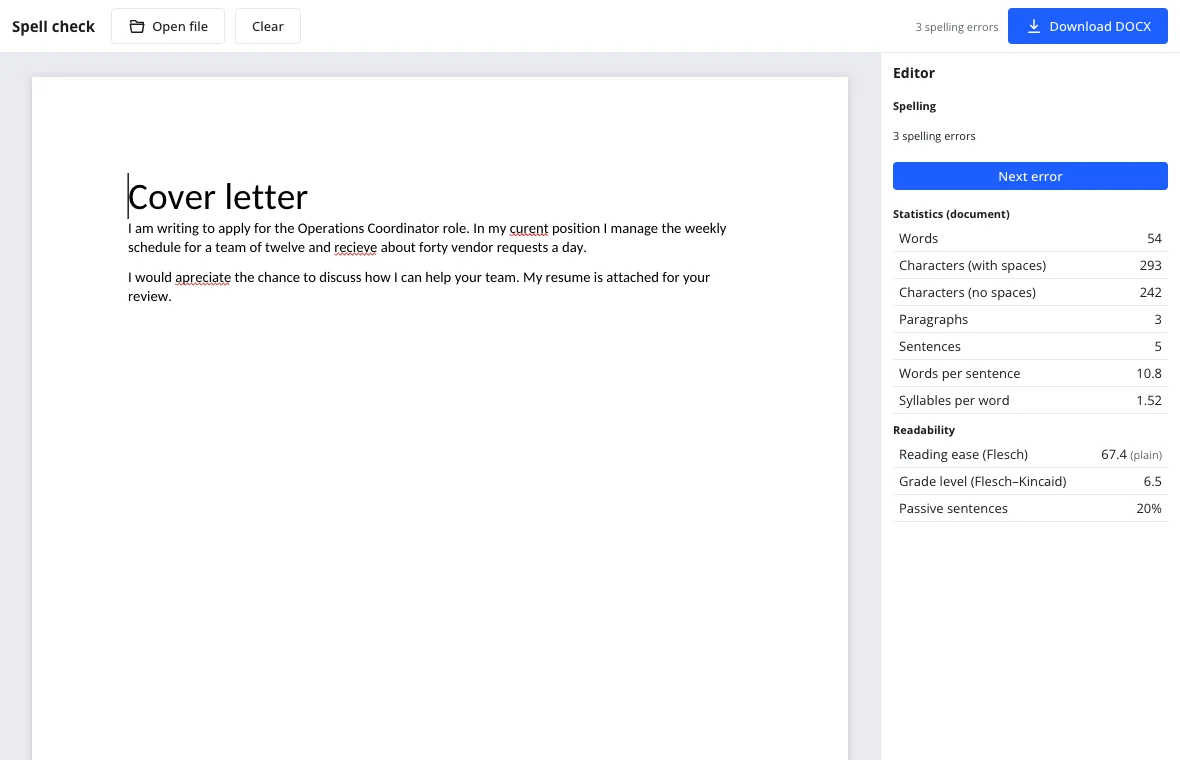
Click the page and paste or type. Open file reads a DOCX, TXT, Markdown or HTML document right in the browser. Misspellings get a red underline as you type, and the top bar shows how many there are.
Work through the errors
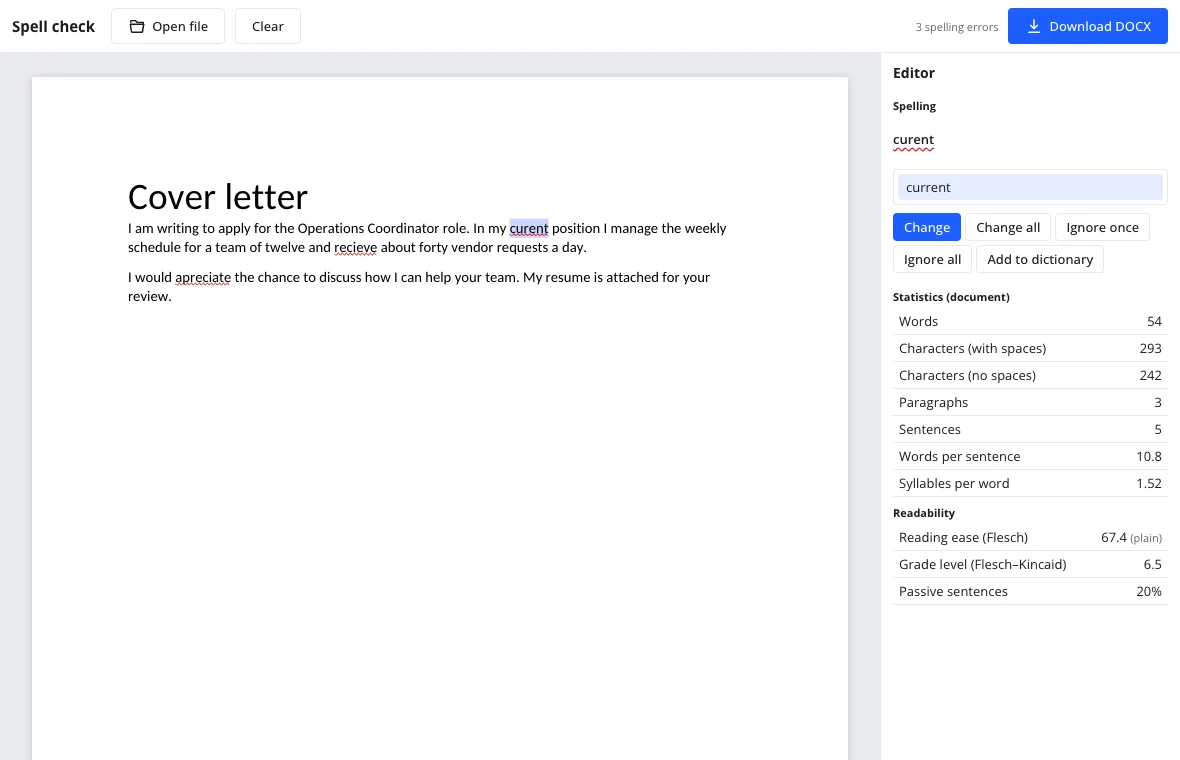
Right-click a word for suggestions, Ignore all and Add to dictionary. The Editor pane on the right offers Change, Change all, Ignore once, Ignore all and Add to dictionary, and Next error takes you to the next one.
Download the clean copy
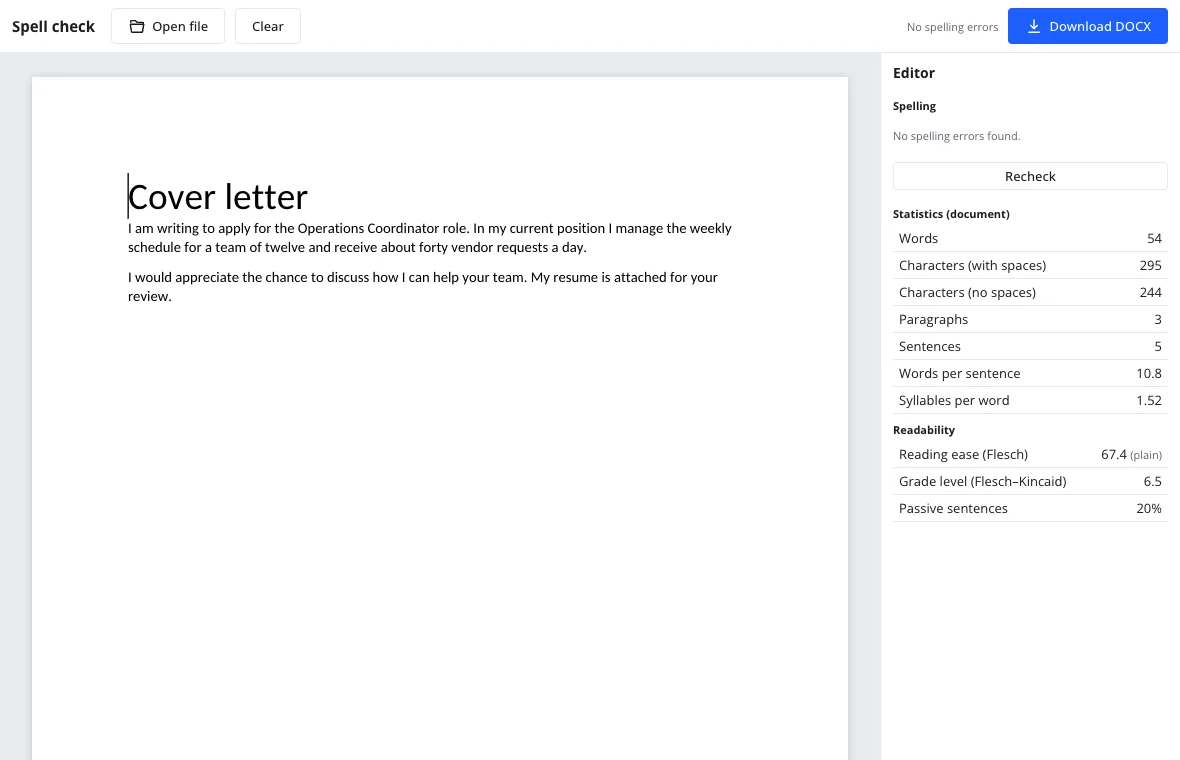
When the top bar says No spelling errors, download the result with Download DOCX or start over with Clear. The Editor pane also shows word statistics and readability scores.
What spell check online does
Every word is looked up in a dictionary, and unknown ones get a red wavy underline. Right-click for replacement suggestions, Ignore all and Add to dictionary; the Editor pane then goes through the errors one by one with Change, Change all and Ignore. In the full editor the same check opens with F7.
Russian words are checked against an open Russian dictionary and Latin words against US English, so mixed text is checked in both languages at once.
Check spelling and sentence: what is checked
Spelling is checked; punctuation and grammar are not — not yet. Commas, sentence structure and style are planned for a later AI release. For now this page fixes misspelled words only.
| What | Checked |
|---|---|
| Spelling of words | Yes |
| Punctuation | Not yet |
| Grammar and style | Later, with AI |
| Abbreviations and web addresses | Skipped |
When you need a spelling checker
Job applications
Run a cover letter and resume through it before you submit; a typo is the easiest reason to be passed over.
College work
Proofread an essay or personal statement before it goes to the portal.
Tax season
Check names, addresses and notes before uploading anything to an e-filing portal.
Everyday email
Catch the mistakes that make a quick message look careless.
Check spelling in English and Russian
Each word is checked in the dictionary of its alphabet: Cyrillic in Russian, Latin in English. This edition loads the English dictionary and adds Russian when Cyrillic text appears. It uses US spelling, so British spellings such as colour or organise may be flagged, which is expected.
Spell check online without a browser extension
You do not need to install anything, including an extension: the checker is a page in your browser. Open it, paste the text and fix the errors, then close the tab. That is useful on a locked-down work laptop where extensions are blocked.
Limitations
- Punctuation, grammar and style are not checked yet; AI suggestions come later.
- Only English and Russian dictionaries are included.
- All-caps abbreviations, words next to digits, web and email addresses are skipped.
- Words added with Add to dictionary last until the tab closes here; in the full editor with an account they are saved for every document.
- British spellings may be flagged because the English dictionary follows US spelling.
Privacy and your text
The check runs in your browser and the text is not sent to a server. The dictionary downloads once, which takes a few seconds the first time. This edition follows GDPR; without an account nothing is stored, and with an account documents live in your cloud.
On phone and desktop
The checker works in a modern browser on a phone, tablet or computer, with nothing to install. It is free and adds no watermark.
Frequently asked questions
Support: [email protected]
Where is my spell check?
It is on this page. Paste your text into the box or press Open file, and misspelled words appear with a red wavy underline while the top bar counts them. The Editor pane on the right lists the suggestions, so you can fix each word.
Is there an app for spell check?
No app is needed: the checker runs in your browser, on any device. Open the page, paste the text and fix the underlined words. If you want the check inside a full word processor, open the editor, where the same tools sit in the Editor pane and open with F7.
How do I spell check online for free?
Paste text or open a DOCX, TXT, Markdown or HTML file on this page. The check starts automatically, suggestions appear in the Editor pane, and you can download the corrected text as a DOCX. There is no charge, no trial and no sign-up.
How do I use spell check?
Paste your text, then right-click any underlined word to see replacements, or work through the list in the Editor pane with Change, Change all, Ignore once, Ignore all and Add to dictionary. The top bar shows how many errors remain and says No spelling errors when the text is clean.
How do I check if my spelling is correct?
Paste the text here and look at the top bar: it reports the number of spelling errors, and every flagged word is underlined in red. Open the Editor pane to review the suggestions one at a time. When the bar says No spelling errors, the spelling is correct according to the loaded dictionary.
Does it check grammar and punctuation too?
No, not yet. The tool checks spelling only; commas, grammar and style are not analyzed, and an AI-assisted review is planned for later. It also skips all-caps abbreviations, words next to digits, and web or email addresses, so the underline stays useful.
Is it free? Is there a watermark?
Yes, it is free, with no trial period and no watermark on anything you download. The spelling check, suggestions, statistics and DOCX download cost nothing. An account is only needed if you want to save the document to cloud storage and open it on another device.
Is it safe to upload documents?
Nothing is uploaded: the file is read in your browser, and the spelling check runs there too. Without an account, closing the tab clears the text. This edition follows GDPR, and if you sign in, documents are stored in your own cloud space.
More tools
Word counter
Count words and characters live, plus reading and speaking time.
DOCX to PDF
Convert documents to PDF in the browser with the layout intact.
Letter template
Printable letter templates: cover, business, resignation, thank-you and more.
Resume template
Make a resume online: pick a template, fill it in, download DOCX or PDF.
Track changes
Track changes online: review a DOCX, accept or reject edits, download the result.
Documents
A full word processor in the browser, from cover letters to term papers.
Spell check online: check if your spelling is correct
Spell check online: find and fix misspelled words in text or a document.
Open the editor